
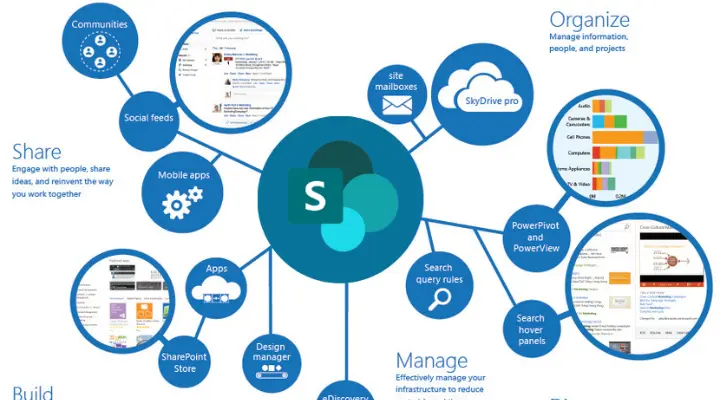

Are You Still Using Outdated Systems to Manage and Share Your Documents? Imagine a world where your business thrives with streamlined operations, enhanced collaboration, and impeccable document management. If your company still relies on outdated, clunky systems to organize, share, and edit files, it's time for a transformative change. Enter Microsoft SharePoint, a revolutionary solution that propels businesses into the future. Trusted by around 80% of Fortune 500 companies, SharePoint centralizes your files, optimizes workflows, and ensures your teams stay connected.
With powerful features like secure document storage, real-time collaboration, and seamless integration with Microsoft Office tools, SharePoint empowers your team to work smarter, not harder. Embrace this upgrade to reduce errors, save precious time, and boost productivity across your organization.
1. SharePoint Document Management
Efficient document management lies at the heart of any organization, ensuring easy access to critical information. Microsoft SharePoint provides a centralized platform for storing, organizing, and managing documents, ensuring that important files are always within reach. The document management system SharePoint enables businesses to handle documents streamlined and securely, enhancing collaboration and productivity across teams.
Capabilities: SharePoint boasts advanced features like version control, metadata tagging, and document check-in/check-out. These tools streamline workflows and reduce redundancies. It also offers automation for routine document-related tasks, freeing up valuable time.
Benefits: Centralized document storage ensures that everyone is working on the most up-to-date files, reducing confusion over outdated or duplicate documents. SharePoint's cloud-based infrastructure ensures access from any device, anytime, which fosters improved collaboration across remote or distributed teams. SharePoint document management helps drastically improve business operations, making it an indispensable tool for your organization's efficiency.
2. Enhanced Collaboration
Using SharePoint as an intranet fosters a collaborative culture with its robust set of features. By centralizing resources, communication, and tools, using SharePoint as an intranet allows employees to work seamlessly, share information quickly, and stay aligned on projects. This integrated platform enhances transparency, guaranteeing that all team members are always informed of the most recent developments.
Key Features: Real-time co-authoring, shared workspaces, and built-in communication tools (such as chat and comment functionality) allow teams to collaborate on documents and projects seamlessly. Integrating SharePoint with Microsoft Teams further enhances collaboration by consolidating chats, meetings, and documents in one place.
Advantages: The ability to work together in real-time means that teams can make quicker decisions and keep all stakeholders on the same page. Using SharePoint as an intranet and its collaborative tools break down silos, making communication more fluid and efficient, resulting in better project outcomes.
3. Using SharePoint as an Intranet
Microsoft SharePoint serves as an excellent platform to build an intranet that supports internal communications and strengthens the organizational culture. Using SharePoint as an intranet allows businesses to centralize resources, share important updates, and foster better communication across teams. By using SharePoint as an intranet, organizations can ensure that all employees have easy access to vital information, promoting transparency and collaboration.
How It Works: SharePoint allows businesses to create a centralized hub for sharing news, updates, policies, and resources. Employees can quickly access company-wide announcements, and departmental news, and collaborate with colleagues.
Benefits: A SharePoint-driven intranet promotes transparency, keeps employees engaged, and streamlines access to important information. It helps to unify an organization by creating a single source of truth, thereby reducing confusion and fostering a positive work environment. Using SharePoint as an intranet helps businesses create an internal communication hub that drives employee engagement and fosters company culture.
4. Customizable and Scalable
One of SharePoint's most appealing aspects is its flexibility to meet the specific needs of any business, regardless of its size. SharePoint document management allows businesses to customize and organize their document storage, making it easy to meet the demands of their unique workflows.
Customization: SharePoint offers flexible customization options to adapt its features to the specific workflows and needs of your organization. Businesses can create custom lists, forms, and dashboards, or even develop specific solutions through SharePoint development services. This ensures that the platform aligns with company processes.
Scalability: SharePoint is designed to grow with your business. Whether you're a small team or a global enterprise, SharePoint scales seamlessly to accommodate increasing demands, such as adding users or expanding to new locations, ensuring that it remains an ideal solution for long-term use. As your business expands, SharePoint document management and SharePoint development services can scale alongside your needs.
Customizable and Scalable
5. Integration with Microsoft Office Suite
The deep integration of SharePoint with other Microsoft Office tools like Word, Excel, and Outlook makes it an indispensable tool for boosting productivity. SharePoint document management enhances this integration by ensuring that all files and documents are stored securely in a centralized location.
Benefits: SharePoint integrates seamlessly with Microsoft Office applications, allowing employees to collaborate on documents without leaving the platform. Files in SharePoint can be opened and edited directly from Word or Excel, and data from Excel can be synced back to SharePoint for reporting. The integration with Outlook streamlines communication by combining emails, tasks, and calendar events in one place.
Outcome: This integration reduces the need to switch between different software, streamlining workflows and helping employees focus on the tasks that matter most. Furthermore, SharePoint works with Power BI, enabling businesses to create data visualizations that offer actionable insights.
6. Security and Compliance
The deep integration of SharePoint with other Microsoft Office tools like Word, Excel, and Outlook makes it an indispensable tool for boosting productivity. SharePoint document management enhances this integration by ensuring that all files and documents are stored securely in a centralized location.
Security Features: SharePoint provides enterprise-grade security with features such as role-based access control, multi-factor authentication, and data encryption. It also includes monitoring tools to track user activities and flag any suspicious actions.
Compliance: SharePoint supports compliance with industry standards like GDPR, HIPAA, and more, helping businesses maintain proper data retention policies and audit trails. By offering tools for secure document management, SharePoint document management helps mitigate risks related to data breaches and legal non-compliance.
7. Document Management System SharePoint
Unlike traditional document management systems, SharePoint is a comprehensive, flexible solution that helps businesses manage documents smarter. With advanced features like version control, metadata tagging, and automated workflows, the document management system SharePoint ensures better organization, quicker access, and improved document handling across your organization.
Features: SharePoint features advanced search capabilities, metadata filtering, and automated workflows that ensure documents are easy to find and manage. Its integration with artificial intelligence allows SharePoint to automatically categorize and tag documents for better retrieval.
Advantages: SharePoint replaces outdated document management systems by offering greater scalability, flexibility, and integration capabilities. It empowers employees with tools that simplify document handling, helping them focus more on strategic tasks rather than searching for information. Document management system SharePoint goes beyond simple storage by improving the organization and accessibility of documents.
8. SharePoint Development Company
To fully realize the potential of SharePoint, many businesses seek the expertise of a specialized SharePoint development services company. These services help businesses customize SharePoint according to their unique requirements, ensuring a tailored solution that maximizes SharePoint's features and functionality.
Role: SharePoint development companies bring in-depth knowledge of the platform and provide tailored services that ensure SharePoint is aligned with business objectives. They offer expertise in customizing SharePoint solutions and can also address unique business requirements, enabling businesses to make the most of the platform's features.
Benefits: A SharePoint development company can assist in designing workflows, creating user-friendly interfaces, and implementing SharePoint effectively, thus optimizing its functionality and ensuring a smooth user experience. Their support reduces the chances of costly mistakes and ensures the solution is scalable for future growth.
9. SharePoint Development Services
Professional SharePoint development services are essential for businesses looking to maximize the ROI on their SharePoint investment. These services ensure that the platform is fully customized, integrated, and optimized to meet specific business needs, helping organizations get the most out of their SharePoint deployment.
Services Offered: These services include custom application development, SharePoint migration, and third-party integrations. Development companies can also offer ongoing updates and maintenance, ensuring the platform remains up-to-date and performs at its best.
Importance: SharePoint development services ensure businesses are equipped with the right tools to tackle specific challenges. By having a development partner, organizations can keep SharePoint running smoothly and ensure it continues to deliver value as the business evolves. Utilizing expert SharePoint development services ensures that businesses can fully utilize SharePoint's potential and keep it running efficiently.
10. Cost-Effective Solution
SharePoint provides a cost-effective alternative to the need for multiple separate tools, making it a smart financial decision for businesses of all sizes. By leveraging the document management system SharePoint, companies can consolidate their document storage, collaboration, and workflow management into one unified platform, reducing costs and improving efficiency.
Cost Benefits: SharePoint consolidates a range of tools into a single platform for document management, collaboration, and intranet services, which reduces the need for purchasing standalone solutions. It also minimizes the cost of employee training since the platform integrates so seamlessly with familiar Microsoft Office tools.
Value: SharePoint helps businesses achieve greater efficiency and productivity, delivering a high return on investment. Its cloud-based infrastructure further reduces the costs of maintaining on-premises hardware and software, making SharePoint a financially attractive option for businesses.
Conclusion
Microsoft SharePoint stands out as a game-changing platform for businesses striving for operational excellence. Its flexibility, security, collaboration features, and cost-effectiveness make it a must-have for companies looking to streamline their workflows, enhance collaboration, and protect sensitive data. By choosing SharePoint and working with expert developers, businesses can unlock the platform's full potential and ensure long-term success.
At RMM Technology, we excel in providing comprehensive technology solutions that cater to your business needs. As a premier service provider, we specialize in Cloud Solutions, Enterprise Application Services, Product Engineering, Mobile App Development, Website Development, and Digital Transformation.
Our collaboration with you ensures that your projects align perfectly with your vision and business goals. We offer top-notch services to keep your web applications running smoothly, securely, and efficiently over time.
By choosing Microsoft SharePoint, you can streamline your operations, enhance collaboration, and protect sensitive data. Our team of expert developers is dedicated to unlocking the full potential of SharePoint for your business, ensuring long-term success.